- Change theme

5 Red Flags to Spot When Buying a Used Phone Online
Avoid scams when buying used phones online. Learn key red flags like fake photos and hidden locks, and use Dr.Fone IMEI Check for safe verification.
16:00 06 November 2025
As buying used phones online becomes more common, the risks grow equally bigger. Many buyers fall for cheap offers without knowing the phone may be stolen or locked. Scammers usually hide details, making it hard to trust what you see. That is why learning to spot early warning signs is so important. Hence, this article explains key red flags and shows how an IMEI checker reveals the truth.
Red Flag 1: Why Are Some Sellers Reluctant to Share Details?
A seller who avoids details should concern every serious buyer looking for safety. If someone avoids sharing details, it can mean they are hiding something serious. One major warning is the refusal to provide the phone’s IMEI number when asked. Without this, you cannot confirm if the device is blacklisted or stolen.
Moreover, honest sellers also agree to meet in safe, public places for inspection. In case they resist or keep delaying, it shows a lack of trustworthiness. Before moving forward, always perform an IMEI check free to confirm the device’s real status and history.
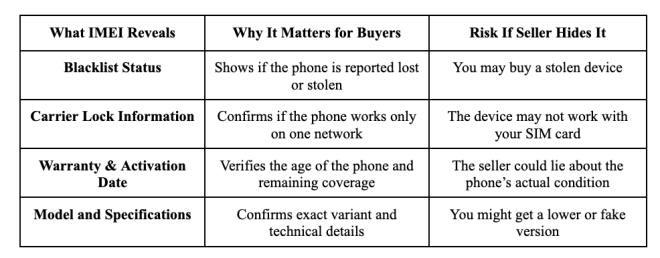
Why Refusing to Share an IMEI Number is a Major Warning
When a seller refuses to share the IMEI, it limits your ability to verify important details. This simple number can uncover issues that photos or words will never reveal:
Red Flag 2: What Makes Prices Unbelievably Low?
Unrealistically low prices often signal a problem that the seller is hiding. Many times, these devices are stolen and quickly listed to attract fast buyers. In other cases, the phone may have water damage that is not visible in photos. Some sellers also list devices locked to specific carriers, making them unusable elsewhere.
A low price is designed to create urgency, pushing buyers into quick decisions. Always pause before believing such offers and demand full verification. Using a free IMEI checker can confirm whether the device is blacklisted or hiding another serious issue.
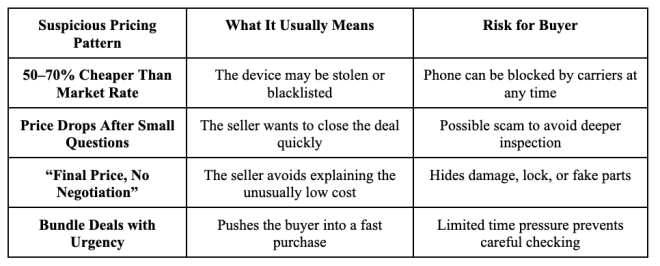
Why “Too Good to Be True” Often Means a Scam
When a price seems far below the usual market value, it usually signals hidden trouble. Scammers use this trick to attract quick buyers who ignore proper verification steps:
Red Flag 3: Stock Photos: The Smart Choice for Visual Content
When sellers use stock photos instead of real images, it creates serious doubt. Stock photos are polished and hide the actual condition of the phone being sold. A device may have scratches, cracks, or battery issues that will not appear. Some scammers even post listings without owning the phone, using images copied online.
This makes it impossible for buyers to confirm the device’s real state before paying. Always request genuine, timestamped photos taken by the seller to ensure transparency. To protect yourself further, use an IMEI checker and confirm the phone’s true status before making any decision.
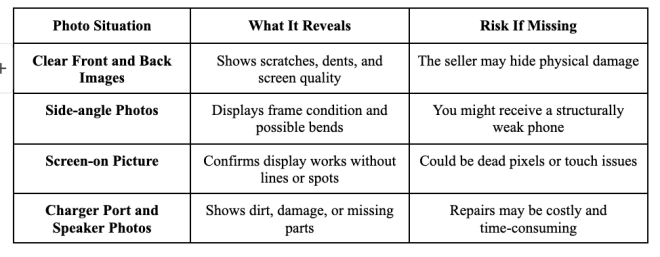
Why Real Pictures Matter When Buying Used Phones
Real photos reveal the phone’s actual condition, helping you spot scratches or hidden issues. Without them, you risk buying a device that looks nothing like what was promised:
Red Flag 4: The Device Has Not Been Factory Reset
A phone that has not been factory reset signals a high risk for potential buyers immediately. Devices still logged into iCloud or Google accounts often remain permanently locked. Such locks block activation, preventing normal usage even if the hardware is fully functional.
During inspection, always ensure the phone is reset in front of you carefully. In case the device remains locked, you should use Dr.Fone – Screen Unlock (iOS) to bypass iCloud, and Dr.Fone – Screen Unlock (Android) handles FRP. Finally, confirm authenticity by running an IMEI check free beforehand.
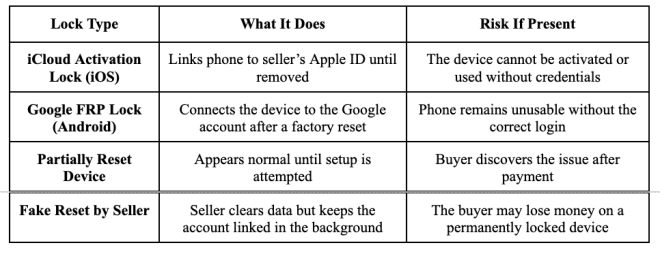
The Hidden Danger of iCloud and Google Locks
iCloud and Google locks may not show until after a reset, trapping buyers unexpectedly. Once active, these locks make the phone completely unusable without the original owner’s login.
The Ultimate Verification: Run a Free IMEI Check
The most effortless way to confirm a device’s authenticity is using a free IMEI checker. Dr.Fone Online Unlock instantly reveals blacklist status for both Android and iOS devices. Users can even instantly access more than 20 device verification options. It shows Apple Activation Lock details and whether iCloud accounts remain linked.
You can also verify MDM lock information and confirm carrier restrictions on the phone. A detailed report is generated within seconds, providing complete device verification data. Besides, you can save the final report securely for future reference and protection. Warranty information for Apple, Samsung, Huawei, OPPO, and VIVO devices is also available instantly.
Key Features
- Samsung Knox: Displays whether Samsung’s KNOX Guard system is active on the device.
- Device History: Shows phone’s blacklist, lock, and warranty history from verified databases.
- Part Number: Reveals the official Apple part number for authenticating the device’s original configuration.
Detailed Guide to Run a Free IMEI Check Using Dr.Fone Online Unlock
Go through the given steps to understand how you can use this advanced tool:
Step 1. Open the Dr.Fone IMEI Check Website
From the drop-down menu labeled “IMEI Check,” pick the specific category you’d like to verify.
Step 2. Input the IMEI Number
Enter your device’s IMEI code into the provided text field and press “Check Now” to move forward.
Step 3. Get and Save the IMEI Results
After processing, you’ll receive a complete report with all available device details. Upon accessing it, click the “Save Report” button to download it and keep a secure copy.
Conclusion
To conclude, buying a used phone online always carries hidden risks you cannot ignore. Checking the seller’s behavior, photos, and prices helps, but it’s never enough alone. The safest step is using an IMEI checker for honest verification. For reliable and instant results, Dr.Fone Online Unlock makes this final check simple and trustworthy.