Looking for free alternatives to Luma AI? Compare six AI video generators by features, video quality, free plans, and limitations to find the right tool for your creative needs.
Article Content
AI video generators make it easier to turn written ideas, images, and creative concepts into moving visuals. However, different platforms offer different levels of realism, creative control, and access to free features. If Luma AI doesn't fit your budget or workflow, exploring alternatives can help you find a more suitable tool. In this guide, we'll compare six AI video generators, including their main features, advantages, limitations, and free access options, so you can choose the right platform for your next project.
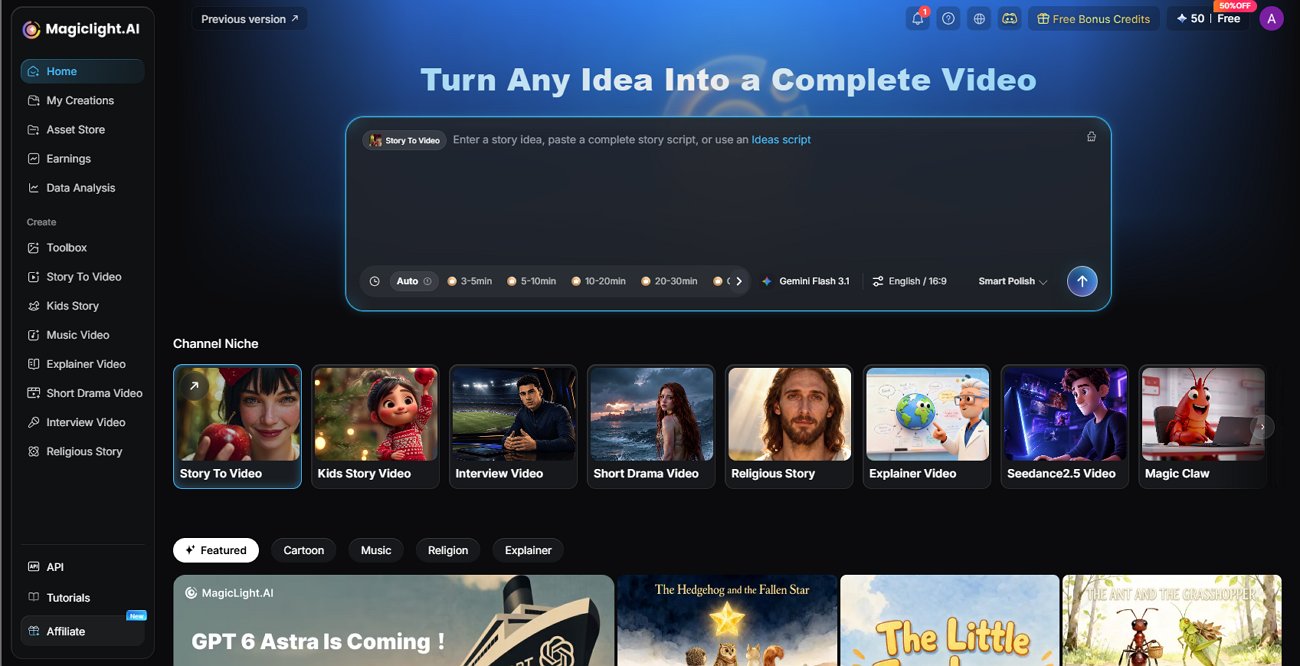
1. MagicLight.AI
MagicLight.AI is an AI video creation platform designed for creators who want to turn ideas and scripts into structured videos. Rather than focusing exclusively on short visual clips, it emphasizes story-driven production, character consistency, and an integrated workflow for building longer videos.
Its features include script-to-video creation, text-to-video, image-to-video, AI-generated characters, and voice-related tools. These capabilities can be useful for educational videos, animated stories, explainers, and narrative content.
Pros:
- Supports story-driven video creation.
- Offers tools for generating scenes and maintaining character continuity.
- Combines several video production tasks in one workflow.
- Provides limited free access for users who want to explore the platform.
Cons:
- Free credits may limit how much content you can generate.
- Complex projects may require additional generations and editing.
- Its story-focused workflow may be more than necessary for users who only need a single short clip.
Best for: Creators who want to turn scripts or ideas into multi-scene videos, especially when recurring characters and narrative structure matter.
2. Kling AI
Kling AI is an AI content creation platform with video generation and motion-related tools. It is worth considering if your priority is creating visually detailed clips from text prompts or reference images.
The platform supports workflows involving text-to-video and image-to-video, allowing users to describe a scene or animate a still image. Depending on the model and available controls, creators can experiment with movement, composition, and visual styles.
Pros:
- Supports text-to-video and image-to-video workflows.
- Offers tools for experimenting with motion and visual storytelling.
- Suitable for creative clips, concept visuals, and social media content.
Cons:
- Free access and promotional credits may vary.
- Complex prompts may require several attempts.
- Longer projects may need additional editing to connect individual clips.
Best for: Creators who want to experiment with AI-generated motion and visually engaging short videos.
3. Runway
Runway is an AI-powered creative platform that combines video generation with image, audio, and editing-related tools. It is useful for creators who want to experiment with AI visuals while retaining control over the broader production process.
Its generative models can help users explore visual concepts, create short clips, and develop footage for creative or commercial projects. Runway is particularly relevant to filmmakers, designers, and content teams that want to combine generated assets with conventional editing.
Pros:
- Offers a range of AI creative tools.
- Supports visual experimentation and video production workflows.
- Provides access to selected generative tools through its free plan.
Cons:
- Free credits are limited.
- More extensive generation can require a paid subscription.
- Advanced workflows may take time to learn.
Best for: Creators who want a flexible AI production environment for experimenting with visuals and building polished projects.
4. Pika
Pika is an AI video generation platform focused on making creative video effects and transformations accessible. It is worth exploring if you want to experiment with playful visual concepts, stylized clips, or image-based animations.
Depending on the tools available, users can create or transform short videos and explore effects designed to make visuals more expressive. This can be useful for social media content, creative experiments, and eye-catching promotional clips.
Pros:
- Provides tools for creative video effects.
- Supports experimentation with generated visuals.
- Can be useful for short-form content and stylized ideas.
Cons:
- Access to free generation may be restricted.
- Some features or additional generations may require purchased credits.
- Effects-driven clips may need further editing for professional projects.
Best for: Social media creators and hobbyists who want to experiment with distinctive video effects.
5. PixVerse
PixVerse is an AI video creation platform that supports text-to-video and image-to-video workflows. It can be useful for turning a written description or static image into a short moving scene.
The platform also offers different models and generation settings, giving users opportunities to experiment with visual styles and output quality. For creators producing social media clips, concept videos, or short visual sequences, these options can help speed up ideation.
Pros:
- Supports text-to-video and image-to-video generation.
- Offers daily free credits according to its published FAQ.
- Provides multiple generation settings and model options.
Cons:
- Free credits are limited and may expire daily.
- More demanding generations may consume credits quickly.
- Results may need several attempts to match the intended scene.
Best for: Users who want to experiment with short AI-generated videos and make use of recurring free credits.
6. Hailuo AI
Hailuo AI is another option to consider when exploring AI-generated video from text prompts or images. It can suit users who want to test different visual concepts without building a complicated editing workflow from scratch.
As with other generative platforms, the quality of the result depends on the prompt, reference material, model, and generation settings. Clear descriptions of the subject, camera movement, lighting, and action can help communicate the intended scene.
Pros:
- Useful for exploring prompt-based video creation.
- Can support image-led creative workflows, depending on available features.
- Suitable for testing visual ideas and short clips.
Cons:
- Free access and generation limits can change.
- Prompt refinement may be necessary to achieve the desired result.
- A series of short clips may require separate editing to form a longer video.
Best for: Creators who want to test another AI video generation workflow before committing.
How to Choose the Best Free Luma AI Alternative
With several platforms available, the right choice depends on what you want to create and how often you plan to generate videos. Comparing a few practical factors can help you avoid choosing a tool based on visual quality alone.
1. Compare Video Quality and Generation Capabilities
Start by identifying the type of video you need. If you're producing realistic scenes or cinematic clips, prioritize visual coherence, natural motion, and control over the scene. If you're creating animated stories or educational content, character continuity and the ability to connect scenes may be more important.
Whenever possible, test the same prompt across multiple platforms. This provides a more useful comparison than relying on demonstrations created with different prompts and settings.
2. Check Free Credits, Usage Limits, and Watermarks
A free plan does not always mean unlimited video generation. Some platforms provide one-time credits, others offer daily allowances, and some restrict free access to selected features or purchased credit packs.
Before starting, check:
- How many video generations you can make.
- Whether credits renew daily, monthly, or only once.
- Whether exports contain watermarks.
- Which resolutions and generation models are available.
- Whether commercial use is permitted.
3. Consider Character Consistency and Creative Control
Generating one attractive clip is different from producing a sequence of connected scenes. For recurring characters, a consistent visual style, or a story that develops over time, you may need stronger reference-image controls and a workflow that supports continuity.
If your project consists of standalone social media clips, this may be less important. For narrative videos, educational series, or animated storytelling, it can be a deciding factor.
4. Match the Tool to Your Video Creation Needs
Different platforms serve different creative goals. Kling AI and Hailuo AI are worth testing for generated visual scenes, Runway offers a broader creative toolkit, Pika emphasizes effects-driven experimentation, and PixVerse provides an accessible way to explore short-form generation.
MagicLight.AI is particularly relevant if you want to move from a script or story idea toward a structured, multi-scene video. Instead of treating every clip as a separate project, its workflow focuses on bringing story elements together.
5. Why Consider MagicLight.AI for Story-Driven Videos?
If your goal is to produce complete videos rather than isolated clips, MagicLight.AI is worth considering. Its script-to-video workflow, character tools, scene generation, and voice-related features are designed to help creators develop connected narratives.
This can be useful for storytelling channels, educational content, explainers, and animated videos where recurring characters and a coherent sequence of scenes matter. Its free access is limited, so check the available credits before planning a larger production.
Conclusion
The best free alternative to Luma AI depends on your creative goals, desired video quality, and available credits. Kling AI, Runway, Pika, PixVerse, and Hailuo AI are worth exploring for different short-form generation workflows, while MagicLight.AI is a strong option to consider for script-based and story-driven video creation. Compare the current free-plan restrictions and test a few tools before deciding which one best fits your needs.
Frequently Asked Questions
1. What is the best free alternative to Luma AI?
There is no single best option for every creator. PixVerse is worth testing for short-form generation with daily credits, Runway offers one-time free credits for exploring its tools, and MagicLight.AI is worth considering for story-driven videos. Your best choice depends on the features and limits that matter most to you.
2. Are there any completely free alternatives to Luma AI?
Some AI video platforms offer free credits or limited free access, but that does not necessarily mean unlimited generation. Allowances, watermarks, export quality, and commercial-use permissions vary. Check each platform's current terms to understand what you can create without paying.
3. Which free AI video generator is best for text-to-video creation?
The right tool depends on your preferred style and workflow. Kling AI, PixVerse, Hailuo AI, and other generative platforms are worth testing for short text-to-video clips. If you want to turn a written script into a connected, multi-scene story, consider exploring MagicLight.AI as well.