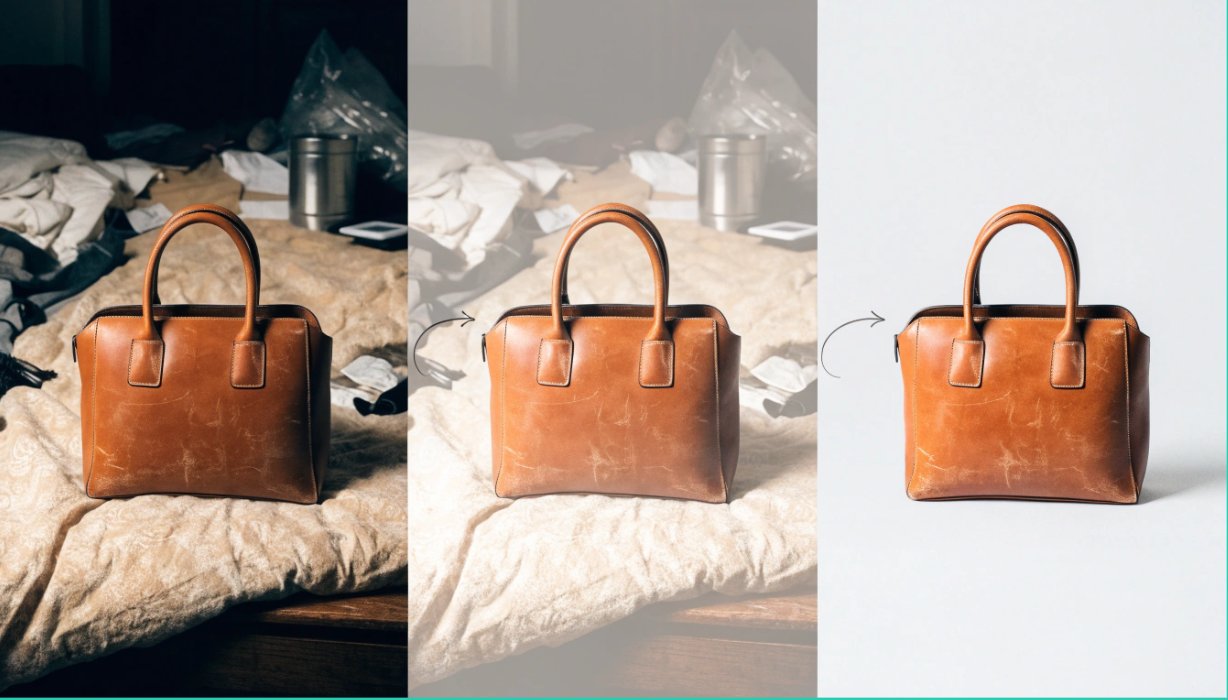
Anyone who has sold used items online knows the problem. The item is in good shape, the price is fair, and the listing still sits for weeks because the photos look like they were taken in a hurry. A cluttered bedroom background, a yellowish lamp glow, a shadow across the product: buyers scroll past without a second thought.
Reshooting everything is often not an option. The item may already be sold, shipped, or packed away, and many sellers manage dozens of listings at once. This is where a Free Image to Image AI tool can help. Instead of starting from scratch, you upload a photo you already have and have the AI transform it into a cleaner, more appealing version.
This guide covers how image-to-image AI works, why it suits second-hand sellers, and how to use it without misleading buyers.
What Is Image-to-Image AI?
Most people know AI image generation as typing a text prompt and getting a brand-new picture. Image-to-image AI works differently. You start with an existing photo, and the AI uses it as the foundation. You describe what you want changed, such as a cleaner background, better lighting, or a different style, and the tool produces a new version that keeps the core subject while applying your edits.
For second-hand sellers, this matters because your product photo is already the most important asset you have. You don’t need an imaginary product. You need the real one presented better. Image-to-image tools respect that by building on your original rather than replacing it.
Why Second-Hand Sellers Benefit Most
New retailers get professional product photography from suppliers. Second-hand sellers are on their own, and their challenges are specific.
Every item is unique. You can’t reuse a manufacturer’s stock image, because buyers want to see the actual item. That means one photo shoot per product, and it adds up fast.
Photos are often taken in imperfect spaces. Living rooms, garages, and bedroom floors are normal photo studios for private sellers. Backgrounds are messy, and lighting is inconsistent.
First impressions drive sales. On marketplaces like Facebook Marketplace, Carousell, eBay, Poshmark, Depop, and Vinted, the thumbnail does most of the selling. A clean, bright image earns the click, and the click earns the sale.
Time is limited. Casual sellers and side-hustle resellers can’t spend hours editing each photo in complex software.
A free image-to-image tool addresses all four problems at no cost, which matters when your profit margins are measured in a few dollars per item.
Practical Ways to Refresh Your Listing Photos
1. Clean Up Cluttered Backgrounds
The most common problem in second-hand listings is a distracting background. A pile of laundry behind a jacket or a cluttered shelf behind a vase pulls attention away from the product. With image-to-image AI, you can ask for a plain, neutral, or softly lit backdrop so the item becomes the focus.
Use simple language in your prompt, such as “plain white background” or “light grey studio backdrop.” Neutral tones work well because they make the product look consistent across your whole shop.
2. Improve Lighting and Colour
Indoor photos often come out too dark, too yellow, or too blue. Because lighting changes how colour appears, a poorly lit photo can make a navy bag look black or a cream sofa look beige.
Ask the AI to brighten the image and balance the colours so the result looks like natural daylight. Then compare it with the real item. Accuracy matters, and the goal is a photo that looks the way the product looks in person.
3. Create a Consistent Shop Style
If you run a reseller shop with many listings, visual consistency builds trust. Buyers browsing your profile should see a cohesive collection rather than a random mix of angles and backgrounds. By running your existing photos through the same style instructions, you can give your entire inventory a unified look without reshooting anything.
4. Produce Lifestyle-Style Presentations
Sometimes a product looks better in context. A decorative lamp might sell faster when shown on a tidy side table, or a pair of sneakers might appeal more against a simple outdoor surface. Image-to-image tools can help you create staged-style visuals from your base photo. This works best for furniture, home décor, and accessories, where buyers want to picture the item in their own space.
5. Revive Old Photos
Many sellers have older listings that never sold, or photos saved from previous posts that look dated or grainy. Instead of deleting those listings, refresh the images and relist. A new main photo can make an old listing look new in a crowded feed.
A Simple Workflow You Can Follow
- Start with the best original you have. AI can improve a decent photo, but it can’t fix a blurry or heavily cropped one. Make sure the item is in focus and fills most of the frame.
- Upload it to the tool. Open the image-to-image editor and add your photo.
- Write a clear, specific prompt. Describe only what you want changed, for example “clean white background, bright natural lighting, keep the product exactly the same.”
- Review the result carefully. Check edges, textures, logos, and small details. AI sometimes alters things you didn’t ask it to change.
- Compare against the real item. Make sure colour, size, and condition still match reality.
- Keep at least one honest, unedited photo. More on this below.
Prompting Tips for Better Results
Good prompts are short and concrete. A few habits help:
- Say what must stay the same. Phrases like “keep the product unchanged” help preserve details.
- Name the lighting. “Soft daylight” or “bright studio light” gives the AI a clear target.
- Avoid vague words. “Make it better” leaves too much to chance. “Remove background clutter and brighten shadows” is much clearer.
- Generate a few versions. Small prompt differences can produce noticeably different results, so try two or three and choose the most realistic one.
Staying Honest: The Rule Every Seller Should Follow
This is the most important section of the article. Image-to-image AI is powerful, and with power comes responsibility. Second-hand buying relies on trust, and buyers are paying for something they can’t inspect in person.
Do not use AI to hide flaws. If a leather bag has scuffed corners, a sofa has a stain, or a phone has a cracked screen, the listing must show it. Removing damage from a photo isn’t enhancement. It’s misrepresentation, and it can lead to disputes, refunds, negative reviews, and account bans on most platforms.
A responsible approach looks like this:
- Use AI to improve presentation (background, lighting, composition), not to change the condition of the item.
- Include at least one unedited photo, especially close-ups of wear, marks, or defects.
- Describe flaws plainly in the listing text.
- Check each marketplace’s rules on edited or AI-generated images, since policies vary.
Honest listings also perform better in the long run. Buyers who receive exactly what they expected leave good reviews and come back, and a strong reputation is worth more than any single sale.
Is a Free Tool Good Enough?
For most second-hand sellers, yes. Your needs are practical: cleaner backgrounds, better light, and a more professional look. You don’t need a full design suite. A free tool lets you test the approach on a few listings before deciding whether it’s worth your time. Start with your slowest-moving items, refresh their photos, and watch whether views and messages increase.
Keep in mind that free tools may have usage limits or processing times that vary, so check the details on the platform you choose.
Final Thoughts
Photos are the storefront of every second-hand listing. A bright, clean, well-presented image tells buyers the seller is careful and the item is worth their attention. With a Free Image to Image AI tool, you can turn photos you already have into stronger listings without a camera upgrade, a studio, or editing skills.
Use it to present your items at their best, and never to disguise what they really are. Do that, and your refreshed photos can earn more clicks, more trust, and more sales from the inventory you already own.